If your business is not showing on Google Maps, the cause is almost always one of six things: you are not actually verified, your video verification failed, the profile is suspended, your address confuses Google, a duplicate listing is splitting you, or you are visible and simply ranking below the fold. Work out which one before you change anything.
The short version
- Most people who think they are not showing on Google Maps are actually visible, just not for the competitive search they tried.
- Search your exact business name first. If it appears, you have a ranking problem, not a visibility problem, and the fix is completely different.
- India now gets video verification by default, and most failures come from missing one of three required shots.
- Indian addresses written with “near” and “opposite” a landmark are a common cause of a wrong or missing pin.
- Keyword stuffed business names get suspended once a competitor reports them, which is a slow fuse rather than a safe shortcut.
- A duplicate listing created years ago by a web designer quietly splits your reviews and your ranking.
In this post
A tailor in Ayanavaram called me convinced Google had deleted his shop. It had not. He was searching “tailor near me” from his home two kilometres away and not finding himself, which is a completely different problem from being invisible. Sorting out which of the two you have takes about five minutes, and as a digital marketing freelancer in Chennai it is the first thing I do on every one of these calls.
First, find out which problem you actually have
Run these three searches on your phone before you touch a single setting. They separate the real problems from the imagined ones.
Search 1: your exact business name. Type your business name exactly as it appears on your signboard, plus your area. If your listing appears, you are on Google Maps. Stop worrying about visibility and skip to reason six, because what you have is a ranking problem.
Search 2: your business name alone. If it appears with your name but not with your area, your address or category needs work. Read reasons four and six.
Search 3: check for the grey box. Open your Google Business Profile dashboard. If you see a suspension notice, a “verify now” prompt, or a message saying the profile is not publicly visible, that tells you immediately which of reasons one, two, or three applies.
Most owners who tell me they are not showing on Google Maps fail this test at search one, and discover they were visible the whole time. That is good news, because ranking problems are far easier to fix than suspensions.
Reason 1: You were never actually verified
An unverified profile is not showing on Google Maps to anyone, and many owners never finish the process because the last step arrived by post and got lost.
Open your dashboard. If it says verify now, the profile exists but is invisible to customers. Google chooses your method and you cannot pick, according to Google’s own verification help page. The options are phone or text, email, a live video call during your business hours, or a postcard.
Two timings worth knowing. Postcard codes arrive within about 14 days and expire after 30, so a code sitting in a drawer for a month is dead. And after you submit, Google says the review itself can take up to five business days, which means the silence you are experiencing may simply be the queue.
Reason 2: Your video verification failed
Video verification is now the default for most Indian businesses, and it is where the majority of failures happen. The video must be recorded live inside the Google Maps app on the phone signed into the account that manages the profile. Pre recorded uploads are rejected automatically.
A passing video runs one to two minutes and shows three things in sequence. Videos that skip any one of them get rejected, and that is the single most common reason a Chennai business stays invisible for weeks.
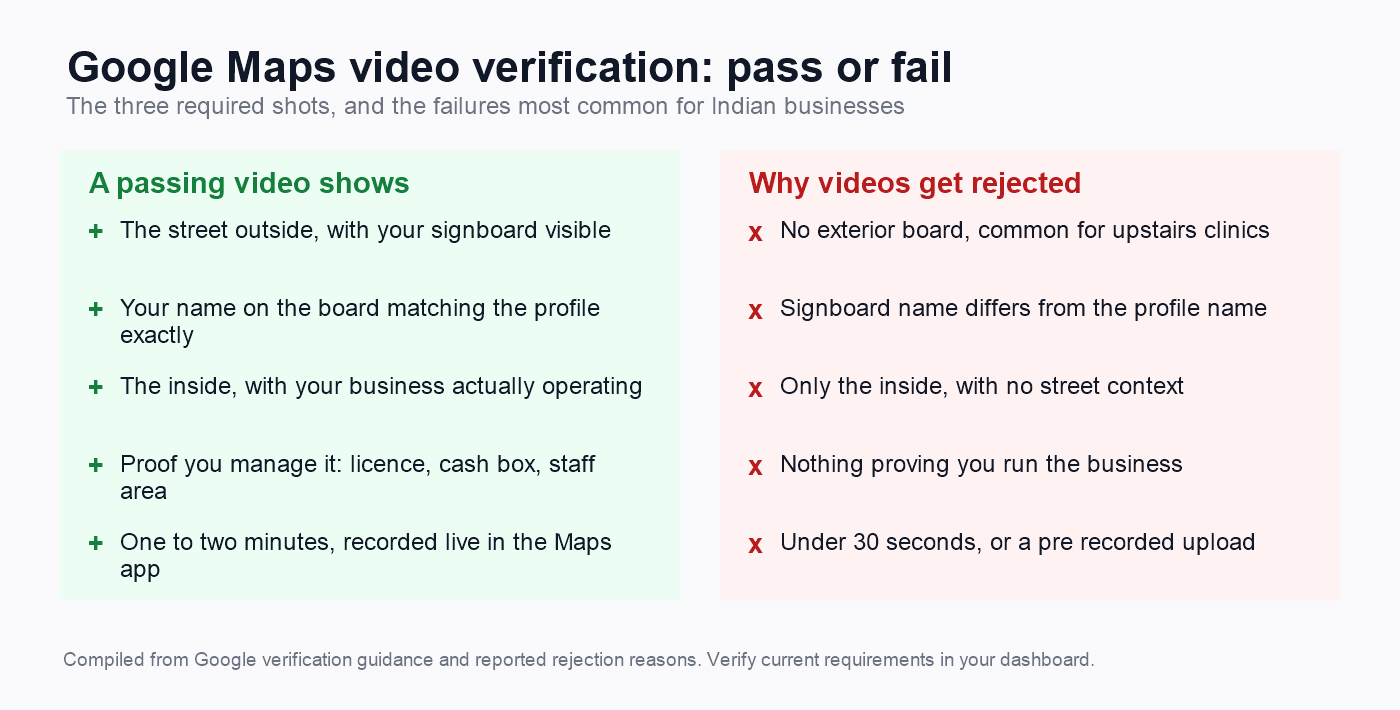
The exterior shot is where Indian businesses fail most. A clinic on the second floor of a residential building, a consultant working from a flat, a tailor inside a covered market, none of these have the shopfront signage Google expects. If you have no board, put one up before you record, even a modest one. It is the cheapest fix on this entire page.
Your signboard must also match your profile name letter for letter. A board reading “Sri Balaji Tailors” and a profile reading “Balaji Tailoring Anna Nagar” is a mismatch, and reviewers reject on exactly that.
For proof that you manage the business, show something a customer could not: unlock a staff drawer, open the cash box, or hold up a licence, GST certificate, or electricity bill with the business name on it.
Reason 3: The profile is suspended
A suspended profile stops showing on Google Maps completely, and the dashboard usually says so in a banner you cannot miss. Suspensions are not random. They follow specific triggers, and three of them are common in India.
Keywords in the business name. “Best Dental Clinic Anna Nagar” instead of your registered name. Google’s profile guidelines prohibit added keywords, location words, and taglines. These names often rank well right up until a competitor reports them.
A virtual or coworking address. A mailing address with nobody staffed during business hours triggers suspension. Service area businesses are allowed, but they must be configured as such rather than pretending to have a storefront.
Too many edits at once. Changing your name, address, and category in the same week looks like an account takeover. Space significant changes out.
To appeal, use the reinstatement form linked from your dashboard, state plainly what the business is and where it operates, and attach evidence: signboard photo, utility bill, GST registration, shop licence. Appeals typically take days to weeks, and vague appeals fail. Send documents, not explanations.
Reason 4: Your address confuses Google
This is the most Indian problem on the list, and the one that international guides never mention.
We write addresses by landmark. “No 12, 3rd Street, near Ayyappan Temple, opposite Saravana Stores, Anna Nagar.” That is perfectly clear to a person and close to meaningless to a mapping system, which wants a street number, a street, an area, and a pin code in defined fields.
Put the landmark in the second address line rather than the main one, and never in your business name. Then open the map pin and drag it onto your actual door. Chennai addresses routinely land the pin on the main road, on the neighbouring building, or in the middle of a block, and a wrong pin sends customers to a stranger’s gate.
If several businesses share one commercial complex, which is normal here, each needs its own suite, floor, or unit number in the address. Without it Google may treat them as duplicates of each other and show only one.
Home based businesses have a separate rule. Hide the address and set a service area instead. Google says a service area should not extend beyond roughly two hours of driving, so a list of Chennai neighbourhoods is right and “all Tamil Nadu” is not.
Reason 5: A duplicate listing is splitting you
Duplicates are quiet killers. Two listings for one business split reviews, split ranking signals, and confuse Google about which is real, so it often shows neither prominently. Owners read that as not showing on Google Maps when the truth is that they are showing twice, weakly.
They usually arrive innocently: a web designer created one years ago, a former employee made another, or Google itself generated a listing from public data before you ever claimed one.
Find them by searching Maps for your business name, your phone number, and your address separately. The phone number search catches duplicates under slightly different names that a name search misses.
When you find one, claim it if you can, then request removal or a merge through profile support. Never simply delete the older listing if it holds reviews, because you lose them permanently. Merging preserves them.
Reason 6: You are visible, just not ranking
This is the real answer for most people who believe they are not showing on Google Maps, including the tailor from Ayanavaram. Your listing is fine. Your position is the problem.
Your listing exists. It appears for your business name. It does not appear when you search “tailor near me” from home, because Maps results change with the searcher’s location and with competition. You are not missing. You are on result eleven.
Two things cause this, and only one is in your control. Distance from the searcher decides a great deal, and you cannot move your shop. Relevance and prominence are yours: your primary category, your review count and rating, your hours, and your photos.
Check your primary category first, because it is the single strongest ranking factor you control. Then look honestly at your reviews against the three profiles ranking above you. If they have ninety and you have six, that gap explains the ranking on its own, and no settings change closes it. My guides to Google Business Profile optimization in Chennai and getting more Google reviews both cover this in detail.
One more test worth running. Ask a friend in a different part of Chennai to search your main term. If you appear for them and not for you, nothing is broken at all, and you are simply seeing your own local results.
If none of the six fixed it
Occasionally a business is still not showing on Google Maps after you have worked through all six reasons. Here is what actually helps at that point, and what wastes your money.
Use the official support channel, not a phone number you found online. From your dashboard there is a help option that opens chat or email support with a real team. Have your case ready before you start: business name, address, what you have already tried, and your documents attached. Vague messages get template replies.
Post in the Google Business Profile community forum. Experienced volunteers there, several of them Product Experts, diagnose these daily and will often spot in minutes what took you weeks. Post your actual business name and address publicly, because they cannot help without it.
Expect weeks, not days, on an appeal. Reinstatements commonly take one to three weeks and sometimes longer. Do not submit a second appeal while the first is pending, because duplicate appeals slow the queue rather than speeding it.
Do not pay anyone promising guaranteed reinstatement. Nobody outside Google can guarantee it, and services claiming an inside route are selling you the same free form you can submit yourself. If you hire help, pay for the work of preparing the case, not for a promise.
While you wait, keep the rest working. Your website, your directory listings, and your reviews all keep bringing customers even when the profile is not showing on Google Maps, which is a good argument for never depending on one channel.
What to do next
- Run the three searches at the top of this page and decide why you are not showing on Google Maps. Do not change settings before you know.
- If it is a verification or suspension problem, gather your documents today: signboard photo, utility bill, GST or shop licence.
- If you are visible and simply ranking low, fix your primary category this week and start asking for reviews.
If you have been stuck on a suspension or a failed video for more than two weeks, get in touch and tell me what your dashboard says. Most of these are solvable once you know which problem you actually have.
Questions I get asked
Why is my business not showing on Google Maps after verification?
Check the dashboard for a suspension banner first, because a profile can be verified and then suspended separately. If there is no banner, search your exact business name. If it appears, you are visible and the issue is ranking rather than visibility. Google also says verification review can take up to five business days, so recent verifications may simply still be processing.
Why is my shop suddenly not showing on Google Maps?
Sudden disappearance usually means a suspension, a duplicate listing that got merged the wrong way, or an accepted edit from a stranger. Google lets anyone suggest an edit to your name, hours, or category. Check your dashboard for a notice, then review your core details against what you last set.
How long does it take for a business to show on Google Maps?
Once verified, a profile usually appears within a few days, sometimes within hours. Verification itself is the slow part: postcards take up to 14 days and Google’s review can add five business days. If three weeks have passed since a successful verification with nothing showing, treat it as a problem rather than a delay.
Why is my business name not showing on Google Maps?
Either the name on your profile differs from what you are searching, or an edit changed it without your knowledge. Search the phone number instead, which finds the listing regardless of name. If the name shown is wrong, correct it to match your signboard exactly and avoid adding keywords, which can trigger a suspension.
What do I do if my video verification keeps getting rejected?
Check that all three required shots are present: the street outside with visible signage, the inside with your business activity, and proof you manage it such as a licence or a staff only area. Record inside the Google Maps app on the account that manages the profile, keep it between one and two minutes, and make sure the signboard matches the profile name letter for letter.
Can I fix a suspended Google Business Profile myself?
Yes, in most cases. Use the reinstatement form from your dashboard and attach documents rather than explanations: signboard photo, utility bill, GST certificate, shop licence. Fix the underlying cause first, usually a keyword stuffed name or an address issue, because appealing without fixing it fails. Expect days to weeks for a decision.
Why does my business show for some people but not for me?
Maps results change with the searcher’s location, so you can appear to be not showing on Google Maps from your own phone while appearing normally for someone nearer your shop. Ask a friend across the city to search your main term. If they find you, nothing is broken, and what you have is a ranking gap rather than a visibility problem.
Does a home based business show on Google Maps in India?
Yes, but it must be set up as a service area business with the address hidden. Showing a residential address you cannot staff during business hours risks suspension. Set your service area as a list of neighbourhoods you genuinely serve rather than an entire state, since Google expects a service area within roughly two hours of driving.
About the author
Tanishka Bhatera is a freelance digital marketing specialist in Anna Nagar, Chennai. She works one to one with small local businesses on websites, SEO, Google Business Profile, social media, and ads, and has talked more than one panicking owner down from a problem that turned out to be a ranking gap. Read more about Tanishka.