A business profile suspended by Google disappears from Search and Maps, and the calls stop the same day. The causes are almost always one of four, and they are the same everywhere because the policy is global: a business name stuffed with keywords, an address that does not match reality, a category or details edit that triggered a re-review, or a home based business showing a full street address it should have hidden. The listing is usually recoverable. What decides it is what you do in the first week, and what you do not do.
The short version
- A business profile suspended by Google is not banned. Most listings come back if you fix the actual violation and appeal once with proof.
- The name field causes more suspensions than anything else. If your Google name is not the name on your signboard, you are carrying the risk.
- Keyword stuffed names rank well right up until the listing goes down. Work out what a three week suspension would actually cost you before you decide.
- Do not create a second listing while you are suspended. It is the single mistake that turns a fixable problem into a permanent one.
- Service area and home based businesses get suspended more, because the address rules are different and most owners never read them.
- Reviews are attached to the listing. Recover the same listing and you keep your shot at them. Abandon it and start a new one, and they are gone for certain.
In this post
There is a particular kind of panic in a business profile suspended message. A salon owner in Anna Nagar sent me a screenshot at 9 in the morning: her listing had vanished from Maps overnight, and her dashboard said the profile was suspended. She had done nothing that day. She had updated her business hours the previous evening.
That is usually how it goes.
Nobody gets a business profile suspended while doing something obviously wrong. You edit a field, the listing goes back into review, and an old problem that was sitting there quietly for two years finally gets looked at.
I am a digital marketing freelancer in Chennai, and I go through this with owners often enough that I wanted the whole thing written down in one place.
What a business profile suspended by Google actually looks like
You find out you have a business profile suspended in one of three ways. An email from Google saying your profile was suspended. A red banner in your Business Profile dashboard. Or, most commonly, a customer telling you they could not find you.
Two things happen at once. The listing disappears from Search and Maps, so new customers cannot find you. And you lose the ability to manage it, so you cannot post, reply to reviews, or update anything.
Google does not publish what happens to your reviews during a suspension, and I am not going to pretend otherwise. What the people who do reinstatements for a living say is that reviews are at risk when a listing is pulled completely, and that they are definitely lost if you give up on the listing and build a new one. That second part is the one you control, and it is why the worst move is starting over.
The name field, where most listings die
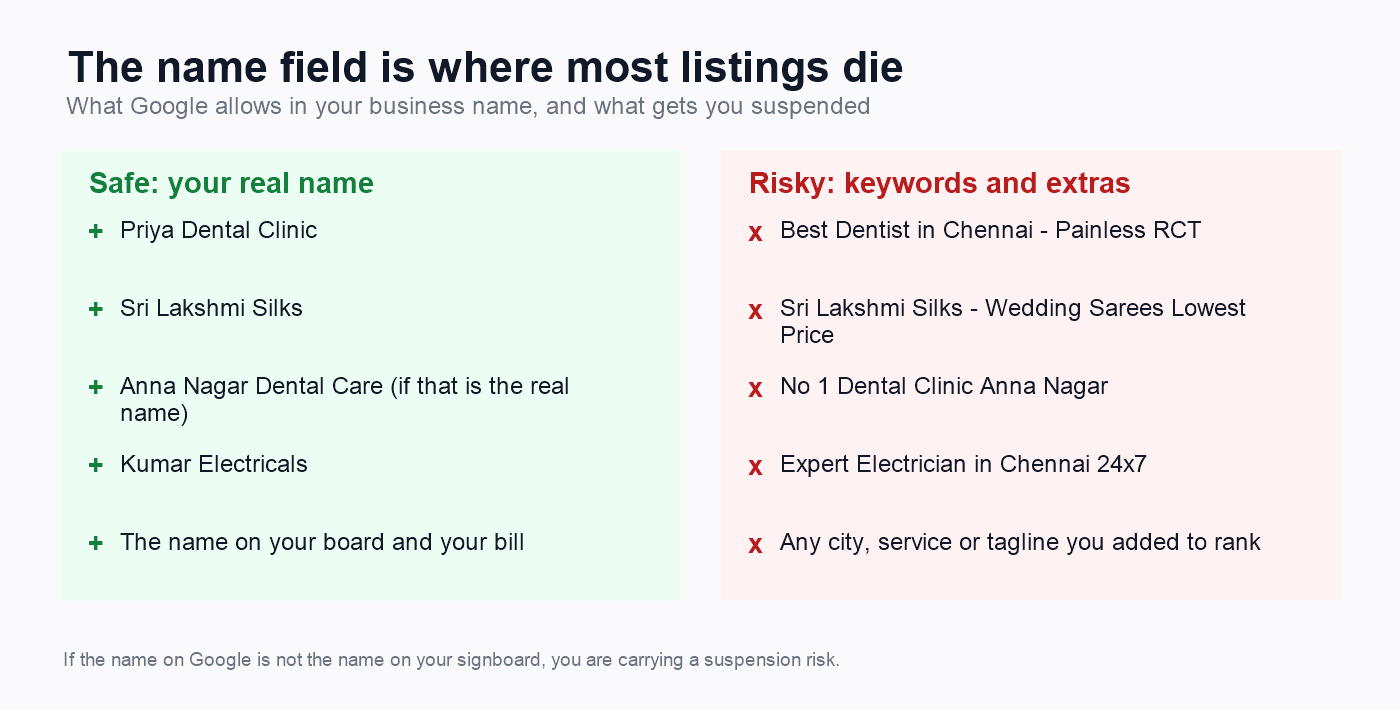
Google’s business name rule is short and most Chennai businesses break it. Your name on Google must be the real world name of the business: the one on your board, your bill, your signage. Not the name plus your city. Not the name plus your service. Not “Best” or “No 1” or “Expert” in front of it.
So “Priya Dental Clinic” is fine. “Best Dentist in Chennai, Painless RCT” is not, even if you genuinely are a dentist in Chennai who does painless root canals.
The reason owners do it anyway is that it works. A listing with the keyword in the name ranks better than one without, at least until someone notices. Competitor reports are a common route to a business profile suspended out of nowhere. That is exactly why Google treats it as a violation rather than a clever trick, and why a long standing violation can sit quietly for years and then surface all at once.
Deciding whether your name is worth the risk
Here’s the thing. Keyword stuffed names work, right up until they do not. That is the whole reason owners use them, and the whole reason Google treats it as a violation.
So the useful question is not “is this allowed”, because the guidelines already answer that. It is “what do I lose if this listing goes down for three weeks”.
For a new business with a handful of reviews, the honest answer is often: not very much. For an established shop with two hundred reviews, years of photos and most of its walk ins coming from Maps, a business profile suspended for a fortnight is a serious event.
Work out which one you are before you decide. The owners who get hurt are the ones who never knew there was a rule, found out from a red banner, and had no other way for customers to reach them.
The 7 things that get a business profile suspended
Google publishes the rules in one place, the guidelines for representing your business on Google, and almost everything that gets a business profile suspended is written there in plain language. Here is what matters for a small business in Chennai.
The name, which I covered above
Google’s words: including unnecessary information in your business name is not permitted, and could result in the suspension of your Business Profile. Taglines, your city, your service, “Best”, “No 1”, your phone number, ALL CAPS. All of it is listed.
An address you do not actually work from
This is the second big one, and it catches honest people.
Virtual offices are simply not eligible. Google is explicit: if you rent a mailing address but do not operate from it, that location cannot have a profile. Not “risky”. Not eligible.
Coworking desks need three things at once. You cannot list an office at a coworking space unless it has clear signage with your business name, receives customers during business hours, and is staffed during those hours by your own staff. A hot desk at a shared space in Guindy meets none of the three.
PO boxes and remote mailboxes are not acceptable. Stated plainly in the guidelines.
If you show an address, you need permanent signage at it. Google expects a business showing its address to have permanent fixed signage with the business name. No board, no storefront listing.
Working from home, or going to the customer
If customers do not come to you, your address should not be on the profile. Google’s own example is a plumber running a business from a residential address: clear the address. You then list service areas instead, up to 20 of them, and Google expects the territory to stay within roughly two hours of driving from your base.
This covers a lot of Chennai: photographers, home bakers, electricians, tutors who travel, freelancers like me. Showing your flat’s door number is not just a privacy problem. It is a reason to get a business profile suspended, because the address fails the signage test.
Duplicates
One profile per location. Google says do not create more than one page for each location, in a single account or across accounts. Duplicates created years ago by a previous agency are a common cause of trouble that surfaces much later.
Categories used as keywords
Pick categories that finish the sentence “this business is a”, not “this business has a”. A bakery that adds “wedding planner” and “event venue” because those get searched is using categories as keywords, which the guidelines prohibit.
Too many edits at once
This one is not Google policy, so I will label it honestly: it is what practitioners consistently report. Joy Hawkins of Sterling Sky and Ben Fisher, both recognised Google product experts, advise against changing name, phone, website, address and category together, and suggest spreading significant edits out rather than doing ten in an evening. Every meaningful edit can send the listing back for review, and a review is when old problems get found.
That is what happened to the salon owner. She changed her hours. The hours were fine. The listing went back into review, and a reviewer looked at everything else.
Being new
This one I only learned while researching this post. Sterling Sky describes a category of suspension that is nobody’s fault: Google does not yet have enough information to believe you are who you say you are. A brand new listing, a new address, no website, no mentions anywhere else. The fix for that is not an appeal. It is building the evidence that you exist, which is the last section of this post.
What to do with a business profile suspended today
Work through this in order. The order is the point.
Step 1: check whether it is the profile or the whole account
There are two different problems that look the same. Your Business Profile can be suspended, or your entire Google Account can be restricted, which takes down every profile that account manages. Google is clear that if the account is restricted, it has to be reinstated first, because a profile appeal cannot succeed underneath a restricted account. Check that before anything else.
Step 2: find the real violation
When you open the appeals tool, it shows you the profile, the reason for the action, and a link to the specific policy you are said to have broken. Read that policy page properly.
Then be honest with yourself. “Suspended for no reason” is the most searched phrase on this topic and it is almost never true. I have not had to appeal one of these myself yet, so what follows is Google’s documented process and what the people who do this daily report, not war stories I do not have. Go back through the name, the address, the hours, the categories, the website link, and whether anyone else has ever managed this listing. Something in there does not match the rules.
Step 3: fix it before you appeal, not after
This is where most people go wrong. They appeal first, get refused, then fix the problem, and now they are arguing with a decision instead of presenting a clean listing. Correct the violation properly, then appeal once with the listing already compliant.
Step 4: get your documents ready
Google names four kinds of evidence: official business registration, a business licence, tax certificates, and utility bills for the business, meaning electricity, phone, cable or internet. The hard requirement is that the business name and address on those documents must match the profile.
There is no India specific document list from Google, so do not trust anyone who gives you one as if it were official. What you can do is map what you have onto Google’s four categories, which is defensible:
- GST registration certificate, as a tax certificate
- Shop and Establishment licence, as a business licence
- Udyam or MSME registration, or your company incorporation, as official business registration
- An electricity, phone or internet bill in the business name, as a utility bill
Check the spelling and the door number on every one of them against the listing before you upload anything. A document where the address reads “20th Street” and the profile reads “20th St” is the kind of mismatch that sinks an otherwise fine appeal.
Step 5: submit the appeal, once
Google’s appeals process runs through its appeals tool, which is what the old reinstatement request form became. You sign in with the account that owns the profile, select the profile, select the decision you are appealing, and submit.
One detail worth knowing before you start: once you open the evidence form, you have 60 minutes to submit it or it does not get attached to your appeal. Have the files on your desktop, named and ready, before you open it.
Step 6: wait, properly
Google says appeal reviews and decisions can take up to five business days. The people who do this work for a living report something different: Elizabeth Rule of Sterling Sky has described an average wait of 22 days or more, and Tim Capper has put normal response times at around 25 to 30 business days. Both things are true statements about different things, and I could not find any figure specific to India, so plan for weeks and be pleasantly surprised.
Your appeal will show one of a few statuses: submitted, approved, not approved, cannot be appealed, or eligible for appeal. If it comes back not approved, that usually means the violation is still there, not that Google hates you.
What not to do, and this part matters more
The mistakes here do more damage than the original violation.
Do not create a new listing. This is the one. Google explicitly says not to create a new Business Profile for the same business while your appeal is under review. Ben Fisher, a Google Diamond Product Expert, puts the consequence bluntly: you could lose all of your reviews, and any ranking power you had will be gone. Support staff have been known to suggest it anyway. Do not do it.
Do not appeal twice. Google says do not submit multiple appeals for the same issue before receiving a decision. A second appeal does not add urgency, it adds confusion.
Do not keep editing the listing while you wait. You are trying to look like a stable, real business. Ten edits during an open appeal is the opposite of that.
Do not send documents that do not match. An old rent agreement with a previous address is worse than sending nothing, because now the mismatch is in writing.
Do not pay someone who guarantees reinstatement. Nobody can guarantee it. There are genuinely good specialists who work on a no result no fee basis, and that is a fair deal. A guarantee is not.
How to never be in this position
Avoiding a business profile suspended notice is mostly boring, and it takes one evening.
Most of this is just making the listing say true things.
Know whether your name matches the board. Open your listing and your shop photo side by side. If they do not say the same thing, you are carrying a risk, and you should at least be carrying it knowingly. Changing it may cost a position or two and it removes the risk entirely.
Make the address match a real place. Your address on Google, on your website, on JustDial and on your GST registration should be identical, down to the door number. Mismatches are what a reviewer looks for.
If you work from home or travel to customers, hide the address. Set yourself up as a service area business and list the areas you cover. A plumber, a photographer, a freelancer, a home baker: none of you should be showing a full residential address.
Do not use a virtual office or a coworking desk as your address unless you genuinely sit there and can prove it with a photo of your signage and a rent agreement. These get flagged often, because many fake listings use them.
Decide your hours deliberately. Owners ask about this constantly, usually believing “Open 24 hours” makes them show up more often. It does not. Google’s guidance on local ranking says local results come down to relevance, distance and prominence, and hours are not on that list. Your listing appears whether you are open or shut, it just shows “Closed” beside it. The one place hours genuinely matter is the “Open now” filter in Maps, which drops closed businesses when somebody uses it. So either answer is defensible. Make it a decision rather than a default, and keep it accurate, because small inaccuracies are what make a reviewer look harder at everything else.
Make edits in one sitting, not drip fed over weeks. Every significant edit can send the listing back for review. One careful pass is safer than ten small ones.
Keep proof in a folder before you need it. Signage photo, utility bill, rent agreement, GST certificate, a photo of you at the premises. If you are ever asked, you want this ready the same day, not assembled in a panic.
Why the rest of your presence decides how bad this hurts
This is the part most guides skip, and it is the reason two businesses with the same business profile suspended notice have completely different weeks.
If your Google listing is the only place you exist online, a suspension takes your entire business offline. No calls, no enquiries, nothing to send people to. If you have a website, a WhatsApp number people already have, an Instagram account, and listings on JustDial and Sulekha, a suspension is annoying rather than fatal. Customers still find you, just by a different door.
There is a second effect. When Google reviews a suspended listing, it is trying to work out whether the business is real. A business with a website at its own domain, consistent listings in local directories, reviews written by real people, and photos that match the address looks real. A listing with none of that looks like one of the thousands of fake entries Google removes every month, and gets treated accordingly.
So the off page work you do when nothing is wrong, the directories, the mentions, the steady review habit, is also your insurance. I wrote about the review side in the weekly system I use for getting Google reviews, and about whether you need the website at all in this test for a Chennai shop.
This is also where most small listings are weakest.
Look at who you share a local pack with. If they have a hundred reviews and you have six, theirs reads as the more established business to a reviewer deciding whether a listing is real. Building that up is slow work done side by side with everything else, and it is the part most owners keep dropping.
What to do next
If you are suspended right now, in this order:
- Do not touch the listing yet, and do not create a new one.
- Find the real violation. Name, address, hours, category, or the business type rules. Be honest, it is almost never “no reason”.
- Fix it properly, not cosmetically.
- Gather your proof: signage, bill, registration, premises photo.
- Appeal once, with the fix already made and the evidence attached.
- Wait. Do not appeal again while the first one is open.
If you are not suspended, which is most of you, spend twenty minutes on the prevention list above. Especially the name field.
I do this for small businesses in Chennai, so if you would rather have someone go through your listing with you, get in touch. And if you want the full setup rather than the emergency version, my guide to Google Business Profile optimization in Chennai covers every field.
The listing is not yours. It is Google’s description of you, and you are allowed to manage it as long as the description is true. Keep it true and the suspension never comes.
Questions I get asked about suspensions
Why was my business profile suspended for no reason?
There is almost always a reason, it just is not the thing you did that day. An edit sends the listing back for review, and a reviewer then checks everything, including a keyword stuffed name or an address problem that has been sitting there for years. Open the appeals tool: it shows the specific policy Google says you broke.
How long does reinstatement take?
Google says appeal reviews and decisions can take up to five business days. Practitioners who handle these regularly report much longer in reality, with Sterling Sky describing averages above three weeks. There is no published figure for India. Plan for weeks, not days.
Do I lose my reviews if my business profile is suspended?
Google does not document this either way. What is clear is that reviews belong to the listing, so if you recover that listing you keep your claim to them, and if you abandon it and create a replacement, they are gone. That is why creating a new listing is the worst available move.
Can I create a new listing while I wait?
No. Google explicitly says not to create a new profile for the same business while your appeal is under review. It will not speed anything up and it can cost you your reviews and your ranking permanently.
Business profile suspended after changing my address. What now?
Address changes are among the edits most likely to trigger a review. Make sure the new address is genuinely where you work, that it has permanent signage with your business name, and that your documents show the same address spelled the same way. Then appeal once with those documents attached.
What does a business profile suspended for deceptive content mean?
It means something on the profile looked misleading to Google: a name that is not the real business name, an address that cannot be verified, hours that do not match reality, or a website link that redirects somewhere else. Read the policy link in the appeals tool, fix the specific thing, then appeal.
Business profile suspended and the appeal was not approved. Is that the end?
Usually it means the violation is still live. Go back to the policy page the tool linked, find what still does not comply, fix it properly, and appeal again once the listing is genuinely clean. If the account itself is restricted, that has to be lifted first or no profile appeal can succeed.
Can I run my business from home and still have a profile?
Yes, but hide the address and set service areas instead. Google’s own example is a plumber working from a residential address: clear the address from the profile. You can list up to 20 service areas, kept within about two hours of driving from your base.
Is a coworking space address safe?
Only if it meets all three of Google’s conditions: clear signage with your business name, customers received there during business hours, and the office staffed during those hours by your own staff. A hot desk does not qualify. A virtual office is not eligible at all.
Should I pay an agency to get it reinstated?
You can do the appeal yourself, and for a simple name or address violation you probably should. Specialists are worth it for complicated cases, repeated refusals, or account level restrictions. Avoid anyone who guarantees reinstatement, because nobody can.